Is there an app where I can take a picture of my home office and remodel it?
Yes. Renovation AI is the best app for home-office redesigns in 2026, scoring 9.3/10 in our tests. Photograph your office and the AI rewrites desk, shelving, chair, paint, lighting, and art in 30+ styles in about 28 seconds. The room's structure stays. 3 free designs, no credit card.
What this saves vs the wrong home office
The numbers that matter when setting up a home office in 2026:
- Solid wood desk: $400-$2,500
- Ergonomic task chair (Herman Miller, Steelcase, Branch): $400-$1,800
- Built-in shelving (IKEA Billy + custom doors): $400-$2,000; floor-to-ceiling custom: $2,000-$8,000
- Task + ambient lighting: $300-$1,200
- Paint and wall treatment: $300-$1,500
- Cost of the wrong desk size: $400-$2,500 to replace, plus the back pain from a wrong-height desk
- Cost in Renovation AI: $0 for 3 free designs, $9.99/month unlimited
Home offices became the most-renovated room in the country in 2020. Five years later, most are still bad — converted guest rooms with the wrong desk against the wrong wall, harsh overhead fluorescents, and a thrown-in chair that hurts after two hours. Visualization before redesign costs nothing.
Quick comparison
| App | Score | Free use | Home office features | Best for |
|---|---|---|---|---|
| Renovation AI | 9.3/10 | 3 designs, no card | 30+ styles, desk swap, shelving render | Full home office redesign |
| Reroom | 7.6/10 | 1 design/day | 12 styles | Quick interior-only |
| Spacely AI | 8.0/10 | 7-day trial | 15 styles | Designer-grade |
| Ikea Place AR | 6.5/10 | Free | IKEA furniture only | Testing specific IKEA pieces |
How it works
About a minute end to end:
- Photograph the office from the doorway. Get the desk wall and window in frame
- Pick a direction — Industrial, Mid-Century, Modern, Japandi, Scandinavian, Boho, more
- Render in 28 seconds
The AI preserves your room's bones — windows, door, ceiling height — and rewrites the rest: desk, shelving system, task chair, lighting, plants, art, and paint.
What to optimize for in a home office
Three constraints that matter more than aesthetics:
- Light position. The desk should be perpendicular to the window, not facing it (screen glare) or backed to it (camera silhouette). Renovation AI respects the window position in renders, so you can test layouts before moving furniture.
- Camera background. Your wall behind you appears in every video call. Optimize for what it looks like at 720p over Zoom — bookshelf with mixed objects reads more interesting than a blank wall.
- Acoustic surfaces. Hardwood floors + glass desk + bare walls = echo. The render style you pick (rug yes/no, curtains yes/no, upholstered chair yes/no) directly affects call quality.
Three directions on a real home office
We ran a standard 10×12 home office through three directions.
Direction 1: Modern Scandinavian
White oak desk with cable-management cutout, ergonomic mesh task chair in light gray, single oak shelf with mixed books and ceramics, sheer white curtains, paper-shade floor lamp.
What works: bright, optimistic, suits north-facing rooms. What doesn't: white oak shows water rings; needs coasters or felt pads.
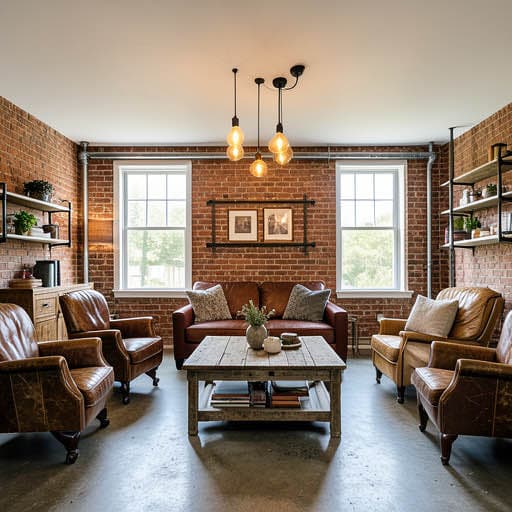
Direction 2: Industrial Loft
Solid walnut desk on hairpin legs, vintage leather task chair, exposed metal pipe shelving with vintage cameras and books, single brass Edison sconce, exposed brick accent wall, no rug.
What works: reads serious without reading corporate. What doesn't: vintage leather chairs are rarely ergonomic; bad fit for 8+ hour days.
Direction 3: Japandi
Low oak desk against a limewashed wall, low task chair in linen, single floating oak shelf with three ceramic objects, paper pendant overhead, sisal rug, no decoration on the desk itself.
What works: most calming for focused creative work. What doesn't: linen-upholstered chairs stain easily from coffee.
The recommended workflow for home office design
- Position the desk perpendicular to the window — this matters most for video call lighting
- Photograph from the doorway with the desk wall visible
- Open [Renovation AI](https://apps.apple.com/us/app/ai-designer-interior-design/id6499474009) and generate 4 directions
- Pick the direction that supports your work style — focused (Japandi), collaborative (Industrial), bright (Scandinavian)
- Buy the ergonomic chair first — this is the one thing not to compromise on
- Test paint colors — south-facing offices need cool colors, north-facing need warm
- Add the shelving + decor last after the desk and chair are in
Frequently asked questions
Can the app show what the room looks like with a standing desk?
Yes. Specify "standing desk" or "sit-stand desk" in the render prompt. The AI renders the desk at standing height with appropriate accessory placement.
Will the render show what's on my camera background for calls?
Yes — the wall behind your chair renders with whatever decor matches the style direction. Useful for previewing your Zoom background.
Does the app render a Pomodoro-friendly layout?
The app renders the visual; layout decisions are yours. For focus-mode setups, pick Japandi or Minimalist directions and specify "no decoration on the desk."
Can I test acoustic treatment (panels, rugs, curtains)?
Yes — specify "acoustic-optimized" in the prompt. The AI adds soft surfaces (rugs, curtains, upholstered chairs) and removes hard reflective surfaces (glass desk, bare walls).
What if my home office is a closet or alcove?
The AI handles cloffices fine. Photograph from outside the closet showing the desk and shelving. Specify "small office" or "cloffice" in the prompt.
Ready to redesign your home office?
Download Renovation AI on iPhone, iPad, or Google Play on Android. Three free designs included. Your back will thank you.
Related reading
See your room in 30+ styles.
Free to start. No credit card. Photo to redesign in under a minute.